Guide to 2D Barcodes (GS1 Digital Link)
Prepare your packaging for the 2027 global retail shift. Learn how a single 2D barcode can process sales at the checkout while connecting your customers to your digital brand story.
Why the Shift to 2D Barcodes?
Traditional 1D barcodes (like EAN and UPC) have worked perfectly for decades, but they only do one thing: provide a string of numbers to a cash register.
2D Barcodes powered by GS1 Digital Link change everything. By storing a secure web address inside a QR-style code, they allow a single scan to serve multiple purposes:
-
For Retailers (Point of Sale): The scanner instantly reads your GTIN (EAN number) and rings up the product.
-
For Consumers (Smartphones): A quick scan links them directly to recipes, warranties, or sustainability info.
-
For Warehouses: Provides instant access to batch numbers and expiry dates.
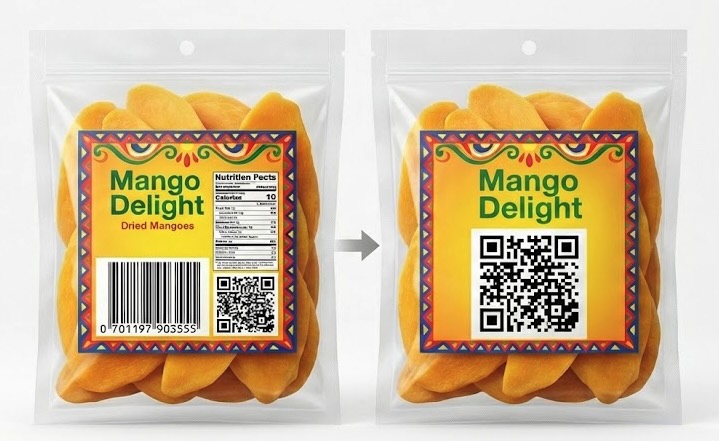
The "Sunrise 2027" Deadline
The global retail industry is actively upgrading its systems. By the end of 2027, major retailers worldwide aim to have full support for scanning 2D barcodes at the checkout. Many smaller stores using modern hardware (like Zebra scanners) can already process them with a simple software update. Integrating 2D barcodes now ensures your packaging won't need an expensive redesign in a few years.
Basic 2D Barcode Generator
Just need the code on your box? All barcodes.ph customers get access to our free Customer Portal. Here, you can instantly generate a static 2D barcode from your EAN numbers, ensuring your product is compliant for the 2027 checkout transition.
Access Free PortalIBN Link Subscription
Ready to unlock the marketing power of your barcode? IBN Link provides dynamic routing—meaning the destination changes based on who scans it (a customer vs. a cashier). Update your links in real-time, add expiry dates, and track scans.
View IBN Link FeaturesGS1 Digital Link Types (For IBN Link Users)
The true power of IBN Link's Resolver is the ability to assign multiple "Link Types" to a single product. For example, a customer using a sustainability app will be automatically routed to your eco-friendly data (`gs1:productSustainabilityInfo`), while a normal smartphone scan might go to your recipe page. Below are the official GS1 supported link types you can utilize.
| Link Type & Syntax | Description |
|---|---|
| Activity Ideas gs1:activityIdeas |
A link to ideas for using the product, particularly with children. |
| Allergen Information gs1:allergenInfo |
A link to a description of the allergens in the product. |
| Brand Homepage (Clinical) gs1:brandHomepageClinical |
A link to a brand presence aimed at clinical professionals. |
| Brand Homepage (Patient) gs1:brandHomepagePatient |
A link to a brand presence aimed at patients. |
| Certification Information gs1:certificationInfo |
A link to certification information about the product. |
| Handling & Storage gs1:consumerHandlingStorageInfo |
A link to information about safe handling and storage of the product. |
| Default Link gs1:defaultLink |
The primary destination if no specific app or context is requesting the scan. |
| Default Link* gs1:defaultLink* |
A set of default links differentiated by HTTP request headers for better matching. |
| EPCIS Repository gs1:epcis |
A link to an EPCIS repository of supply chain visibility event data. |
| Electronic Patient Leaflet gs1:epil |
A link to an electronic patient information leaflet. |
| FAQs gs1:faqs |
A link to a set of frequently asked questions. |
| Handled By gs1:handledBy |
Used for broad redirect patterns without further processing. |
| Has Retailers gs1:hasRetailers |
A link to a list of retailers selling this specific item. |
| Ingredients Information gs1:ingredientsInfo |
A link to facts about the product's ingredients. |
| Instructions gs1:instructions |
A link to assembly instructions, usage tips, or manuals. |
| Leave a Review gs1:leaveReview |
A direct portal for customers to leave a product review. |
| Master Data (B2B) gs1:masterData |
A source of structured master data, typically used for B2B applications. |
| Nutritional Information gs1:nutritionalInfo |
A link to nutritional facts and dietary details. |
| Product Info Page (PIP) gs1:pip |
The main consumer-facing landing page operated by the brand owner. |
| Sustainability & Recycling gs1:productSustainabilityInfo |
Details on sustainable manufacturing, carbon footprint, or recycling instructions. |
| Promotion gs1:promotion |
A link directly to an active promotional campaign. |
| Purchase Supplies gs1:purchaseSuppliesOrAccessories |
Where customers can order refills, accessories, or replacement parts. |
| Quick Start Guide gs1:quickStartGuide |
A description of key features needed to begin using the item immediately. |
| Recall Status gs1:recallStatus |
Real-time information (typically an API) regarding product recalls. |
| Recipe Website gs1:recipeInfo |
A link to cooking ideas or recipe websites associated with the product. |
| Register Purchase gs1:registerProduct |
An entry point for registering product ownership or activating warranties. |
| Related Video gs1:relatedVideo |
A link to video content describing the item or its usage. |
| Reviews gs1:review |
A collection of existing customer reviews and ratings. |
| Safety Information gs1:safetyInfo |
Crucial safety warnings and operational hazards. |
| Service Information gs1:serviceInfo |
Maintenance instructions or service center locations. |
| SmartLabel gs1:smartLabel |
A direct link to the product's official SmartLabel data page. |
| SmPC gs1:smpc |
Summary Product Characteristics specifically for healthcare professionals. |
| Social Media gs1:socialMedia |
A link to the brand's social media channels (Instagram, TikTok, etc.). |
| Support gs1:support |
Helpdesk, chat support, or customer service email portals. |
| Traceability gs1:traceability |
Supply chain tracking and product origin data. |
| Tutorial gs1:tutorial |
Online classes, how-to guides, or structured learning materials. |
| Verification Service gs1:verificationService |
Authentication systems to verify the product is genuine. |
| What's in the Box? gs1:whatsInTheBox |
A complete inventory of parts included in the packaging. |